A capable Android IPTV player for users who bring their own streams
iOPlayer from iObUGGY is an Android media player for organising and playing user-provided IPTV playlists and Xtream Codes, designed for phones, tablets and Android TV. The app focuses on playback, schedule viewing and multi-stream watching, including an Electronic Program Guide and two-stream MultiView. It targets technically confident users who maintain playlists and want a polished player interface and device syncing rather than bundled channel content.
How it handles personal IPTV libraries in daily viewing
In ordinary viewing sessions the app acts as a manager and renderer for streams you supply: it accepts M3U and M3U8 URLs, local playlist files and the Xtream Codes API. That means users must bring their own playlists and provider details; the player itself does not include channel packages. The EPG support helps slot scheduled programs into a living watchlist for planned viewing.
How it connects across devices and a web portal
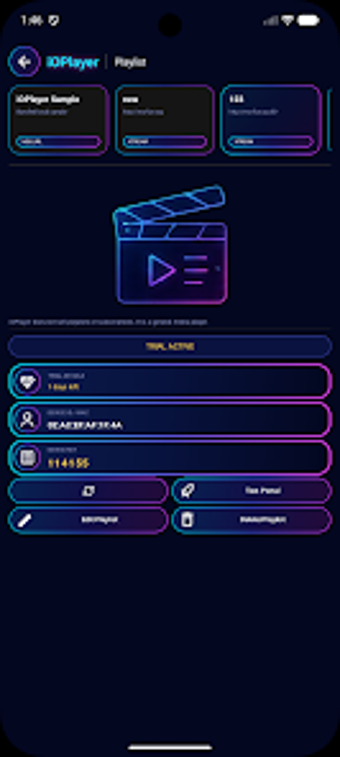
The app supports Android phones, tablets and Android TV, and pairs with a cloud playlist portal for remote management. In practice this enables users to edit or swap playlists on the portal, then sync to devices using a device MAC and Key. The approach suits people who curate libraries centrally and want the same playlists available on a TV stick or mobile device.
How it fits typical living-room and mobile navigation
The interface is clean and optimised for touch and TV remote navigation, and the app provides parental category locks for household control. For viewers who switch locations, MultiView offers watching two streams at once with an audio switch, which helps when monitoring separate feeds during sports or news blocks.
How playback quality and privacy are handled in practice
The player supports high-resolution streams, including 4K when the source supplies it, and is noted for stable playback in user reports. Playlist syncing uses the web portal and device identifiers rather than automatic content discovery, so privacy and data handling focus on account-linked playlist management rather than content ingestion by the app.
To sum up, the app suits hands-on stream managers but not casual channel seekers
The app is a practical choice for technically confident users who curate their own IPTV playlists and want consistent playback across Android devices. It is less suitable for people who expect ready-to-watch channel bundles. For best daily use, prepare and test playlists on the web portal before watching on a TV device, so sessions start without interruption.